In issue #18 of this newsletter I wrote about Shape of AI, the pattern library for AI interfaces that designer Emily Campbell created, and how I use it with clients: as a checklist when a team designs an AI feature, and as a diagnostic when a launched feature is not being used.
What changes when the AI is an agent
Shape of AI covers the loop where you prompt, the AI responds and you judge the result. AI agents expand that loop. The work of an AI agent can continue after you have sent your request and closed the window. A request can turn into several agents working in parallel, and much of the work happens in systems you cannot see.
With agents, the same questions about design patterns come up, both with the teams I work with and in the agent products I use myself. How does a person hand work over to an agent, stay in the loop while it runs, and check what it actually did? So I worked with Claude to map how the products that have already shipped, and the research that is catching up, answer these questions.
The library describes four ways in which an agent works outside the prompt-and-response loop:
- Time: the work continues after the session ends, as with a research run or an overnight job, and the person who briefed it is not there when it finishes.
- Plurality: one request becomes several agents, and one agent serves several people. Neither fits a single conversation thread.
- Initiative: the system starts work in response to an event or a schedule rather than in response to a prompt.
- Distance: the work happens in a sandbox or in another company's API, where the person cannot watch it.
What is in the library
The result is a library of AI agent design patterns on the Think Big Leaders website. It groups more than 30 patterns into seven families, and each pattern refers to the product or the research paper it came from - Google, Anthropic, Microsoft, LangChain, Asana and Notion among them. It also describes eight failure modes that keep recurring in agent products.
Agent design patterns describe how a person hands work to an AI agent and stays involved while it runs. They also describe how the person checks what the agent did, and how one person supervises several agents at once.
Each of the seven families answers one question:
- Handover: what exactly was asked for, and what is the agent allowed to do?
- Oversight in motion: how does a person oversee an agent without watching every step?
- Verification and repair: how does anyone know the agent did what it says it did?
- Reading a crowd of agents: what is this system of agents doing, and where is it stuck?
- Many humans, many agents: how does a team share an agent without losing track of who did what?
- Ambient and asynchronous: how does work reach a person when there is no session?
- Agents as users: can an agent operate a product built for people?
If the idea of keeping a person involved in an AI system's decisions is new to you, I wrote a short primer on human-in-the-loop.
The handover cycle
The library also follows an agentic task through six stages, and control passes between the person and the agent as it goes:
Brief → Plan → Run → Check → Verify → Learn
The person sets the brief. The agent drafts a plan, and the person edits it. The agent runs the task, and the two meet at checkpoints along the way. The person verifies the result. What the system learns feeds into the next brief.
Products built in 2025 and 2026 tend to be strong at the run stage and weak at the brief, verify and learn stages. This imbalance limits how much people delegate.
Example 1: where to place the human checks
One example of such a pattern is where to place the human checks in a long task. Many agent products still ask you to confirm only at the end, so one early mistake can force you to redo everything after it, while confirming every step removes much of the reason to delegate. In a Georgia Tech study presented at CHI 2026, 81% of participants preferred an agent that checks in at a few deliberately placed points, and task completion time dropped by 13.5%.
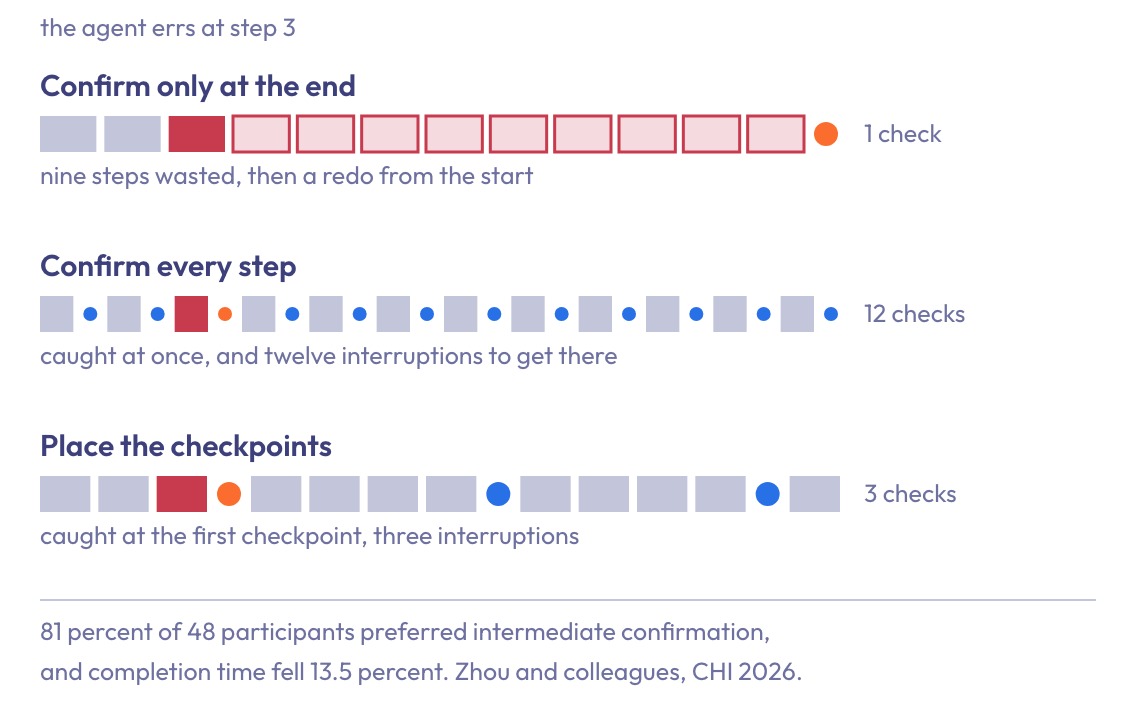
In the library this pattern is called scheduled confirmation. The checkpoints are weighted toward the start of the task, because catching an error in an early step costs less than undoing one that is found near the end. So far the pattern comes from the research, and I have not yet found it in a commercial product.
Example 2: the autonomy dial
Another example is the autonomy dial pattern. Instead of one setting for everything an agent does, you decide how much it may do without asking separately for each type of task. Otherwise one bad experience with one task can lead people to turn off the whole feature.
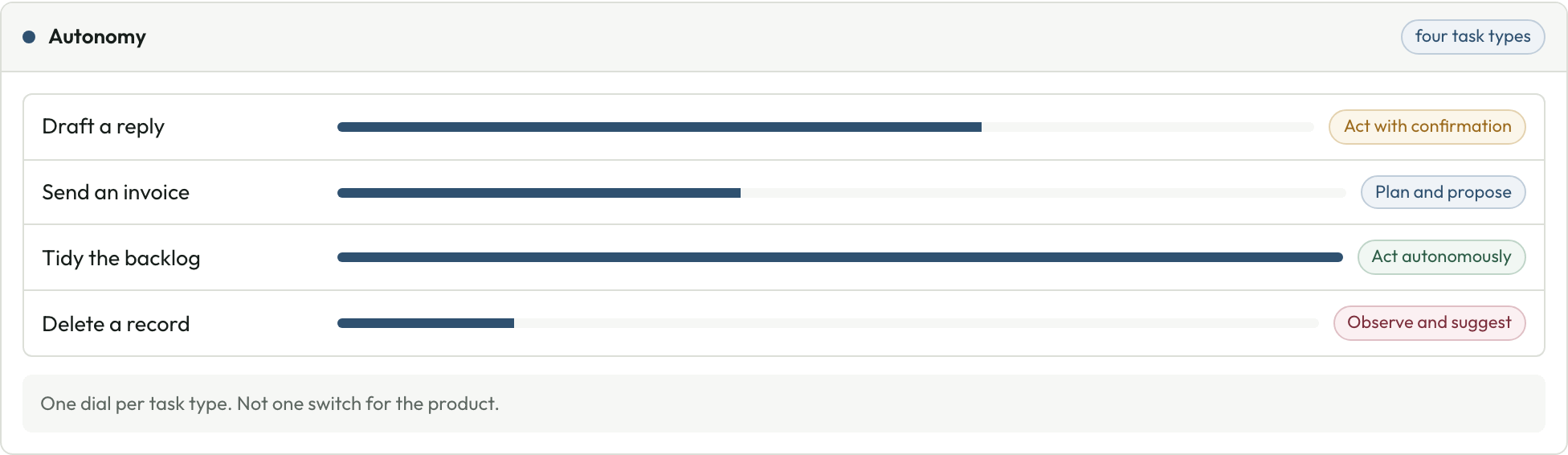
The dial has four levels:
- observe and suggest
- plan and propose
- act with confirmation
- act autonomously
The same agent might draft a reply with confirmation, tidy a backlog on its own, and only suggest when it comes to deleting a record. Microsoft's Magentic-UI is one product where the person sets how often approval is required.
I wrote earlier about the levels of AI autonomy, and about matching the level to the specific business problem.
Eight failure modes
The library also lists eight failures that recur across agent products, and the pattern that addresses each one:
- Confirm only at the end: the agent works for twenty minutes and then asks whether it got the task right. Addressed by scheduled confirmation.
- Transparency theater: the agent shows a long list of tool calls and presents it as its reasoning. There is too much to read and people stop checking the work. Addressed by altitude control.
- One autonomy switch for everything: one setting controls the agent's autonomy for every task it performs. Addressed by an autonomy dial set per task type.
- Silent irreversible action: the agent acts without a preview first or without an undo option. Addressed by intent preview and time-limited undo.
- Notification flood: several background agents each interrupt the person without a view of the bigger picture, and people stop reading the messages. Addressed by an interruption budget.
- Chat as the container for everything: the product forces work that runs in parallel or in the background through one chat transcript. Addressed by an agent inbox and a mission control view.
- Anonymous fleets: agents run without a name or an owner, and without a stated remit. Gartner named this pattern agent sprawl in April 2026. Addressed by an agent registry.
- Confident guessing: when a request is ambiguous, the agent picks a plausible reading without saying so, and presents the result as a finished answer. Addressed by the escalation triad.
Where to look first
When an agent feature ships and people don't use it, the gap may be in the handover or in the verification. Those are the places where people need to change how they work with the agent, and I suggest you look there first.
I use the library the same way I use Shape of AI. Before an agent feature is built, it works as a checklist that specifies the handover and the verification alongside the capability. After a feature is released and is not being used, it works as a diagnostic. For a broader view of building agents, see my 10 design principles for AI agents that work.
The full AI agent design patterns library is on the Think Big Leaders website, along with six short visual decks you can download in English and Swedish. This is a very new field and some of these patterns may not survive the year, so if you see something missing or outdated, I would love to hear about it.
The other half of this issue is about adaptive leadership and what a manager can do when their team goes through an AI transformation.
Your action step
Pick one agent feature: one your team is building, or one your people have stopped using. On one page, walk it through the six stages of the handover cycle, and write down what the person does at each stage. Mark the stages where the answer is "nothing" or "not sure".
Then read the page against the eight failure modes above. Start with the handover and the verification.
If you are designing an agent feature, or trying to work out why one is not being used, that is the kind of question I take on in AI agents for executives sessions, in AI strategy advisory engagements, and as an AI keynote speaker and workshop facilitator.